物聯網核心技術
物聯網(Internet of Things, IoT)聽起來很玄,說穿了就是讓所有的設備、機器能自動回報到監控中心,進行有效的管理與資源分配。舉凡車子、機器、手機、物體…都可以因為大數據的監控,進而分析、了解,並做出即時反應。 這年頭,科技已經讓人類慢慢的從電腦時代,走向手機,更進步到穿戴式裝置上,正因通訊設備愈來愈小,也讓任何東西也開始上網了。物聯網的快速成長,也快速的顛覆傳統的商業模式,速度真的會決定很多事。
核心技術通常是綁在現有的手機、行動狀置上。
1.收集經、緯度與關鍵資訊送伺服器
2.伺服器接收資訊
3.重點分析與應用
來看看實作內容吧~
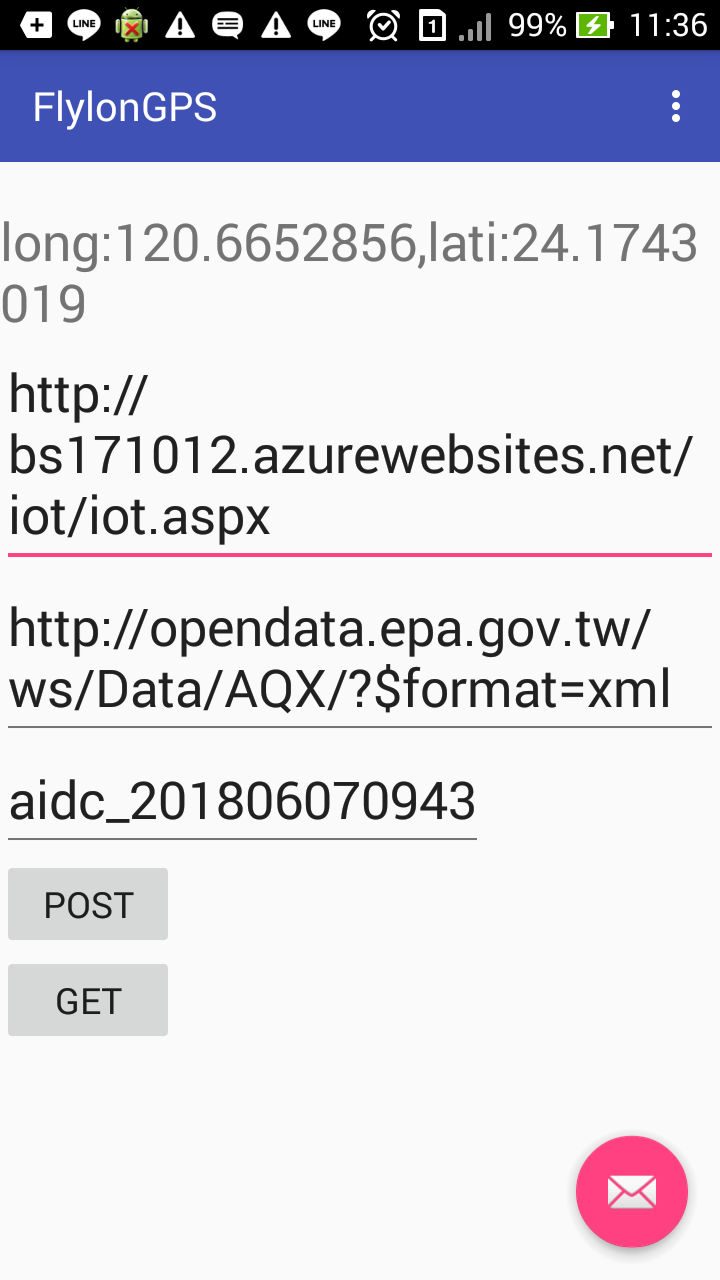
1.收集經、緯度與關鍵資訊送伺服器
package com.ttmac.getlocation;
import android.location.Criteria;
import android.location.Location;
import android.location.LocationListener;
import android.location.LocationManager;
import android.os.Bundle;
import android.provider.Settings;
import android.app.Activity;
import android.content.Context;
import android.content.Intent;
import android.view.Menu;
import android.widget.TextView;
import android.widget.Toast;
public class GetLocation extends Activity  implements LocationListener {
    private TextView mTextView01,longitude_txt,latitude_txt;
    private boolean getService = false;     //是否已開啟定位服務
    private LocationManager lms;
    private Location location;
    private String bestProvider = LocationManager.GPS_PROVIDER;


    @Override
    protected void onCreate(Bundle savedInstanceState) {
        super.onCreate(savedInstanceState);
        setContentView(R.layout.activity_get_location);

        mTextView01 = (TextView)findViewById(R.id.textView1);
        longitude_txt = (TextView) findViewById(R.id.textView2);
        latitude_txt = (TextView) findViewById(R.id.textView3);

        //取得系統定位服務
        LocationManager status = (LocationManager) (this.getSystemService(Context.LOCATION_SERVICE));
        if(status.isProviderEnabled(LocationManager.GPS_PROVIDER)|| status.isProviderEnabled(LocationManager.NETWORK_PROVIDER))
        {
            //如果GPS或網路定位開啟,呼叫locationServiceInitial()更新位置
            locationServiceInitial();
        } else {
            Toast.makeText(this, "請開啟定位服務", Toast.LENGTH_LONG).show();
            getService = true; //確認開啟定位服務
            startActivity(new Intent(Settings.ACTION_LOCATION_SOURCE_SETTINGS)); //開啟設定頁面
        }
     } // onCreate

     private void locationServiceInitial() {
         lms = (LocationManager) getSystemService(LOCATION_SERVICE); //取得系統定位服務
         /*做法一,由程式判斷用GPS_provider
           if (lms.isProviderEnabled(LocationManager.GPS_PROVIDER) ) {
               location = lms.getLastKnownLocation(LocationManager.GPS_PROVIDER);  //使用GPS定位座標
         }
         else if ( lms.isProviderEnabled(LocationManager.NETWORK_PROVIDER))
         { location = lms.getLastKnownLocation(LocationManager.NETWORK_PROVIDER); //使用GPS定位座標
         }
         else {}*/
         // 做法二,由Criteria物件判斷提供最準確的資訊
         Criteria criteria = new Criteria();  //資訊提供者選取標準
         bestProvider = lms.getBestProvider(criteria, true);    //選擇精準度最高的提供者
         Location location = lms.getLastKnownLocation(bestProvider);

         getLocation(location);
     }

     private void getLocation(Location location) { //將定位資訊顯示在畫面中
         if(location != null) {
              Double longitude = location.getLongitude();   //取得經度
              Double latitude = location.getLatitude();     //取得緯度
              longitude_txt.setText(String.valueOf(longitude));
              latitude_txt.setText(String.valueOf(latitude));
         }
         else {
              Toast.makeText(this, "無法定位座標", Toast.LENGTH_LONG).show();
         }
     }

     @Override
     public void onLocationChanged(Location location) {  //當地點改變時
         // TODO 自動產生的方法 Stub
         getLocation(location);
     }
     @Override
     public void onProviderDisabled(String arg0) {//當GPS或網路定位功能關閉時
         // TODO 自動產生的方法 Stub
         Toast.makeText(this, "請開啟gps或3G網路", Toast.LENGTH_LONG).show();
     }
     @Override
     public void onProviderEnabled(String arg0) { //當GPS或網路定位功能開啟
         // TODO 自動產生的方法 Stub
     }
     @Override
     public void onStatusChanged(String arg0, int arg1, Bundle arg2) { //定位狀態改變
         // TODO 自動產生的方法 Stub
     }
     @Override
     protected void onResume() {
         // TODO Auto-generated method stub
         super.onResume();
         if(getService) {
              lms.requestLocationUpdates(bestProvider, 1000, 1, this);
              //服務提供者、更新頻率60000毫秒=1分鐘、最短距離、地點改變時呼叫物件
         }
     }
     @Override
     protected void onPause() {
         // TODO Auto-generated method stub
         super.onPause();
         if(getService) {
              lms.removeUpdates(this);   //離開頁面時停止更新
         }
     }
     @Override
     public boolean onCreateOptionsMenu(Menu menu) {
         // Inflate the menu; this adds items to the action bar if it is present.
         getMenuInflater().inflate(R.menu.get_location, menu);
         return true;
     }
}